Screen time control

Earn your scroll.

Pick the apps that eat your day. Sixteen locks them and pays out minutes for the things your body needs: a walk, a workout, a full night of sleep, a task done. Three breaths buys a short break. Bedtime locks everything.
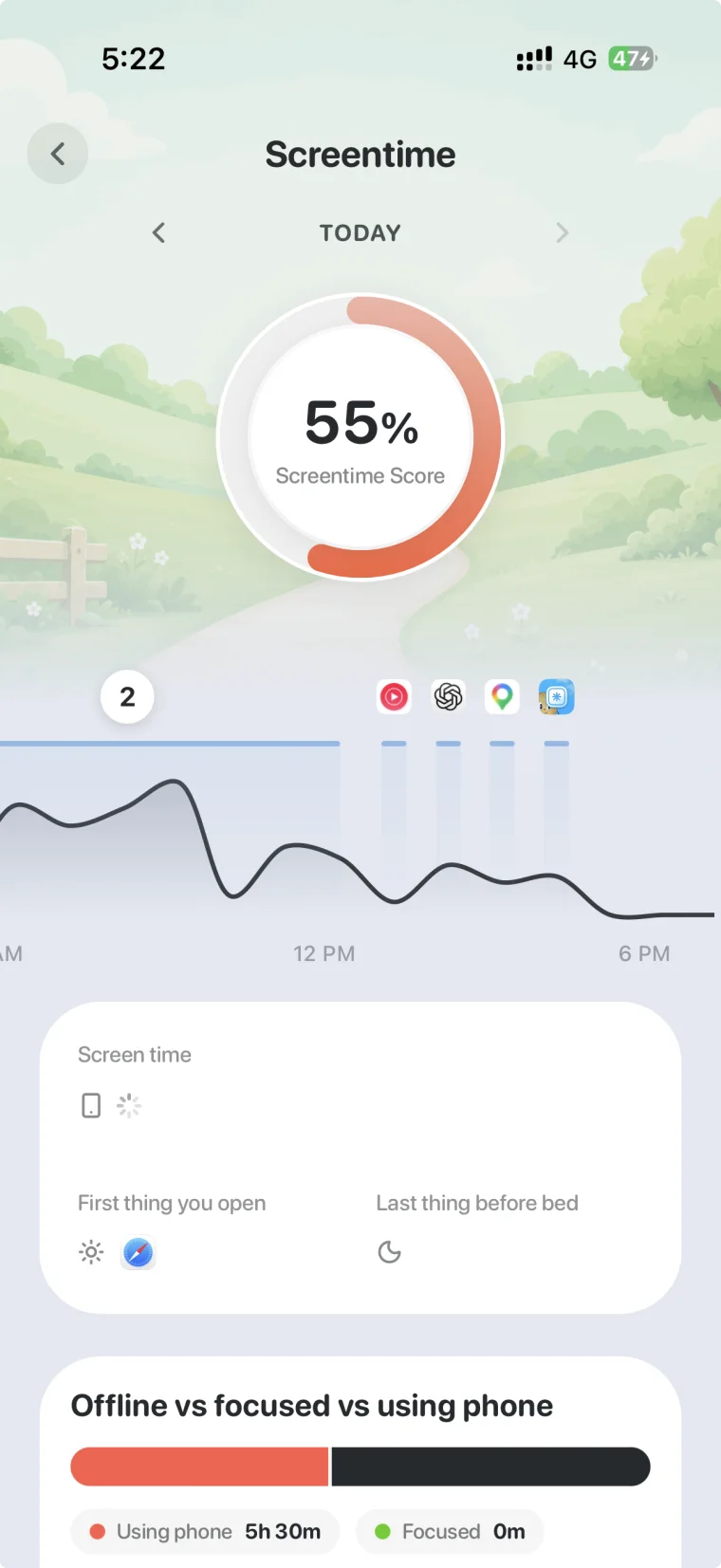
Sixteen screen time page showing a 55% screentime score, a day curve of phone use, first thing you open and last thing before bed

The score that changes the day.

Every other tracker stops at the number. Sixteen locks the apps and lets your body unlock them.

Block the apps that bite

Choose apps and websites. They lock behind a shield with a friendly mascot, not a wall of shame. Some can be always allowed.

Earn minutes

A walk, a workout, a logged meal, a finished task. Each pays into a bank you spend on the apps you locked.

Breathe to unlock

Need a break? Three slow breaths open a ten minute window. Then the shield comes back on its own.

Bedtime lock

Your sleep schedule locks distracting apps for the whole night and releases them in the morning. Last thing before bed stops being a feed.

A screentime score

Total time, first app you opened and last app before bed. The two moments that shape a day, made visible.

Then it changes the day

Measured is not the same as changed.

This is the loop. Sleep, recovery, strain and food are measured. The screen is where the behaviour actually changes. Better nights make better scores, and better scores make the phone easier to put down.

How earning screen time works
Questions people ask

Can you completely block an app on an iPhone?
Yes. Sixteen uses Apple's Screen Time framework to put a shield over the apps you choose. Force quitting Sixteen does not remove it. What you control is the rule for taking it off: a schedule, three breaths for ten minutes, or minutes you earned.
Do app blockers actually work?
The block works at the system level. What fails is a one tap exit. Sixteen makes the exit cost something physical, which is the difference between a limit you ignore and one you keep.
How do I permanently block certain apps?
Put them on your sleep schedule so they lock every night and stay locked until morning, and remove them from the daytime allow list. During the day a breathe break opens a ten minute window and then the shield comes back on its own.
Which apps can Sixteen block?
Any app or website on your iPhone, using Apple's Screen Time framework. You choose the list. Phone, Messages and anything you mark as always allowed stay open.
Can I just unlock everything if I want to?
Yes, and honestly. A breathe break gives you ten minutes. Turning the guard off is always possible. Sixteen is a tool for the version of you that set it up, not a jail.
Does this work without a wearable?
Yes. App blocking, task earning and bedtime locks all work on the phone alone. A watch or strap adds sleep and recovery to the picture.
Is Sixteen for teenagers?
Sixteen is built for adults who want their own phone back. It is not a parental control product and does not manage another person's device.
Sixteen app iconSixteen

Pay once. Keep your data. Earn your scroll.

Sixteen is $99 once for lifetime access, or $19.99 a month. Connect the wearable you already own. No hardware to buy, no membership that expires.

iPhone (iOS 17 or later). Prices in USD.